
From SEO to AEO: Optimising for AI-led Search
Next session: 05 NOV, 2026
£499per personex VAT
5(4)

Training Director, Chris Hutty shares how semantic HTML and accessibility best practices are baked into the redesign of Jellyfish Training pages, using AI as a sounding board.
Most web redesigns start with the same ingredients: a fresh batch of design files, a handful of content fragments, and a well-intentioned plan to "keep SEO in mind." But getting from visual layouts to clean, structured, semantic HTML isn't always straightforward.
Recently, we worked through a full-page redesign process for several Jellyfish Training templates. What made this round different was how we used ChatGPT not as a copywriter, but as a markup strategist.
Here we outline how we did it.
Before jumping into code, it's worth stepping back. Semantic HTML isn't about ticking accessibility checkboxes or following Google’s latest whims. It’s about clarity:
Put simply, semantic HTML is a shared language between humans and machines. If your content structure makes sense in the source code, you're giving every system, from Googlebot to GPTs, a better chance of understanding what you're actually offering.
We started with a high-fidelity design in Figma. Each page represented a different use case: home page, category landing pages, individual course details, informational pages and hybrid sales/training formats like the GA4 Toolkit.
Instead of handing these over directly to devs with vague labels like "hero block" or "course module," we ran each design through a semantic breakdown in ChatGPT.
The prompt wasn’t complicated. It looked more like this:
“Here’s the visual design. Recommend semantic HTML structure using main, section, article, ARIA roles, and heading levels. Nest headings appropriately. Prioritise machine readability.”
From there, we layered in:
It’s important to note that before the action prompt, I primed the AI with a long-form conversation about semantic HTML, accessibility, and content structure - challenging it where necessary. This meant I was confident that we’d minimise any errors or hallucinations.
The result was that each page structure became a boilerplate our developers could interpret and implement with real content. Not line-by-line specs, but a shared scaffold that ensures markup quality.
More importantly, it helped us challenge lazy habits like wrapping everything in div class="block" without thinking about hierarchy.
No surprises here: AI can’t read hierarchy perfectly from images alone. It can make a good start, but that it still needed human judgments to clear up a few hard to interpret content hierarchies.
We had to intervene when:
We also reminded ourselves (and our devs) that this markup was a framework, not a finished product. The job of semantic scaffolding is to suggest intent rather than to lock in precise syntax.
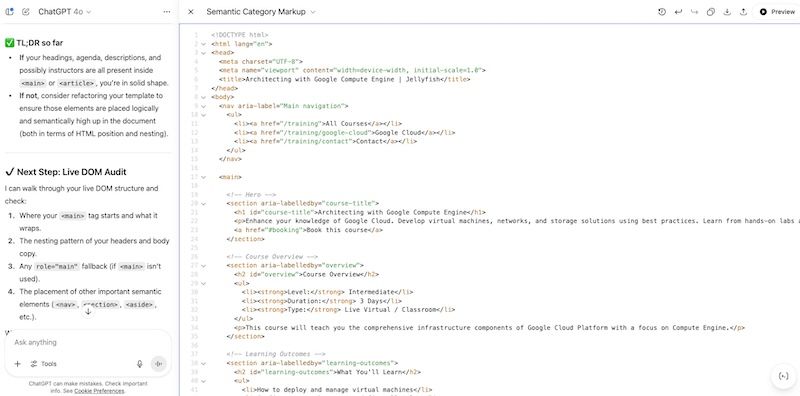 A screenshot of the ChatGPT output with HTML framework and semantic markup
If you're redesigning site templates or building new pages in a component system, you might consider incorporating this process into your workflow:
It won’t replace human logic, but it will force better markup conversations.
With generative search interfaces (Google's AIOs and AI Mode, ChatGPT, Perplexity etc.) indexing and summarising content based on structure, your HTML is no longer just for rendering - it’s for retrievability. As we move from the era of pure Search Engines to Answer Engines it's time to double down on many of the things we should have been doing already but perhaps sometimes slipped through the net.
That means better use of:
The sites that win in this new environment won’t just look well-designed. They’ll be structurally sound, semantically clear, and easy to interpret across systems.
If you’re investing in new page designs, or looking to update your current structures, now’s the time to invest in the markup that supports them.
If you want to explore how ChatGPT can help you in your day to day processes, check out our Introduction to ChatGPT course. Or, if you've already mastered the basics we offer an advanced ChatGPT workflows course - currently available to up-skill whole teams.
If you're interested in how to transition your search strategies in the AI era you can also check out our SEO to AEO course.
Take the next step in your digital learning journey with these featured courses.
Next session: 05 NOV, 2026
Next session: 23 NOV, 2026
Next session: 04 NOV, 2026
Next session: 03 NOV, 2026
Share article

Director, Training

Access the latest digital marketing insights, valuable tips and relevant advice from our experts.
Curious about Google's ad ranking process? Explore our guide to understand the ad rank formula, factors influencing it, and learn how to enhance your ad rank for better search results.
Explore how marketers can bridge the gap between ad reach and audience attention with DV360 Custom Bidding.
Struggling with limited conversion data in Google Ads? Discover 8 actionable tactics to boost performance for businesses with lower conversions.
Get some great tips for cool things you can do using window functions in BigQuery.
Learn how to customise scorecard metric names within Google Looker studio with our easy to follow, illustrated guide
Google has now made tracking conversion rates easier for marketers. Learn about the recent introduction of ‘key event rate’ directly into GA4 reports, making it simpler to measure campaign success.
We spoke with our experts across the global SEO team at Jellyfish, who revealed their journeys into the industry and top tips on kick-starting a career in SEO
Boost your SEO with Topic & Entity optimization. Learn how this dynamic duo improves search rankings and drives organic traffic
In today's digital world, platforms such as Facebook, Instagram, and TikTok are essential spaces for connecting with your customers. Social media isn't just a "nice to have" it's a must-have
Introduction to Traffic Dimensions in GA4: Source, Medium, Campaign and Beyond
Supercharge your GA4 reporting by tailoring it to your team’s needs! Analytics Training Director Chanté Matthews-Mohammed reveals her top customisation tips to help you deliver sharper insights and drive smarter, faster decisions with ease.
Confused by Gen AI strategies? You're not alone. Farhan Qureshi, Gen AI Training Director, shares why AI transformation can stall and how hands-on learning can help your team move forward with confidence.
For further information or any questions you may have, our team is here to help.